
Standing Desk Buying Guide: Converter vs. Full Frame, and What Actually Helps
A practical, no-hype buying guide to standing desks: converters versus full frames, electric versus manual lifts, weight capacity and wobble, and when a standing desk genuinely isn't worth buying.
Somewhere between the fifth "just stand more, it'll change your life" article and the third co-worker who converted to a standing desk and then quietly stopped using it, most people land on the same question: is this actually worth buying, or is it an expensive way to feel briefly virtuous before going back to sitting? The honest answer is that a standing desk solves a specific, narrow problem — reducing long unbroken stretches of static sitting — and it solves that problem well. It does not fix a bad chair, a bad monitor position, a sedentary lifestyle outside of work, or an existing back injury. If you buy one expecting it to replace exercise or cure chronic pain, you'll be disappointed and the desk will end up as a very tall shelf.
This guide is for people who sit at a desk for six or more hours a day, especially anyone who's noticed stiffness, low energy, or a dull ache after long meetings or coding sessions, and who wants a clear-eyed comparison of the real options: desktop converters that sit on top of an existing desk, full standing-desk frames that replace the desk entirely, electric versus manual/crank lifting mechanisms, and the practical details — weight capacity, wobble, cable management — that determine whether the thing you buy actually gets used a year from now instead of becoming a permanent monitor riser.
Quick answer
If you already have a desk you like and just want to try standing part of the day without spending much or committing to anything permanent, buy a desktop converter — something in the $150–$300 range with a gas-spring or crank lift. If you have the budget and the space, and you want a clean single-surface setup with no compromises on stability at height, buy an electric full-frame standing desk with a dual-motor lift, in the $400–$700 range for a well-reviewed model. Skip manual crank desks unless budget is the only constraint — they work, but the friction of cranking through a full height change is exactly the kind of friction that kills a habit. And skip the whole category entirely if you already stand for parts of your day (retail, teaching, service work) — you don't need more standing, you need more sitting, or at least more varied movement.

Desktop converter vs. full frame: the real tradeoffs
A desktop converter is a platform — usually with a separate tier for the monitor and one for the keyboard — that sits on top of your existing desk and moves up and down independently of it. A full-frame standing desk replaces the desk itself; the entire tabletop rises and falls as one surface. Both get you to a standing position. They are not interchangeable choices, though, and the right one depends on what you're optimizing for.
Converters win on cost, reversibility, and commitment. You can buy one, try it for a month, and return it or sell it without having reorganized your entire office. They also work in rented apartments or shared offices where replacing furniture isn't an option. The tradeoff is desk real estate: a converter eats into your existing desk's depth, and most converters have a shallower work surface than a full desk, which becomes cramped if you use multiple monitors, a large notebook, or physical paperwork. Converters also tend to feel less stable at full height, since you're stacking a moving platform on top of a static desk rather than lifting the whole surface as an engineered unit — more on wobble below.
Full frames win on stability, surface space, and cable integration — most have built-in cable trays or channels along the back edge, and because the whole desktop moves together, nothing shifts relative to anything else when you raise or lower it. The tradeoff is cost, footprint commitment, and the fact that you're replacing a piece of furniture rather than adding an accessory. If you rent, or you're not sure you'll keep this desk setup for more than a year, that's a real cost to weigh against the stability gain.
Electric vs. manual crank: why the lift mechanism matters more than people expect
The lift mechanism is the single biggest predictor of whether a standing desk actually gets used regularly, more so than price or brand. Electric desks use one or two motors (dual-motor designs are meaningfully more stable, see below) to raise and lower the desk at the push of a button, typically moving the full height range in 10–20 seconds. Manual crank desks use a hand crank connected to a gear system; raising the desk from sitting to standing height usually takes 20–40 cranks and 30-plus seconds of physical effort.
That difference sounds small until you think about how habits actually form. An electric desk lets you change position on a whim — between calls, mid-afternoon, whenever your body asks for it — because the cost of doing so is one button press. A crank desk turns every height change into a small chore, and small chores get skipped, especially by the third week when the novelty has worn off. In practice, most crank-desk owners we've seen feedback from settle into one height and stop adjusting altogether, which defeats the entire point of a sit-stand desk: the value is in the switching, not in standing per se.
Gas-spring converters (common in desktop converters) split the difference — you unlock a lever and the platform assists the lift, requiring a push rather than a full crank. These are faster than manual crank but slower and less precise than electric, and the spring tension can degrade over a few years of heavy use, leading to a platform that drifts or won't hold position under monitor weight.
If your budget allows it, electric is worth the premium. If it doesn't, a gas-spring converter is a reasonable middle ground. Pure manual crank should be a last resort, reserved for the tightest budgets.
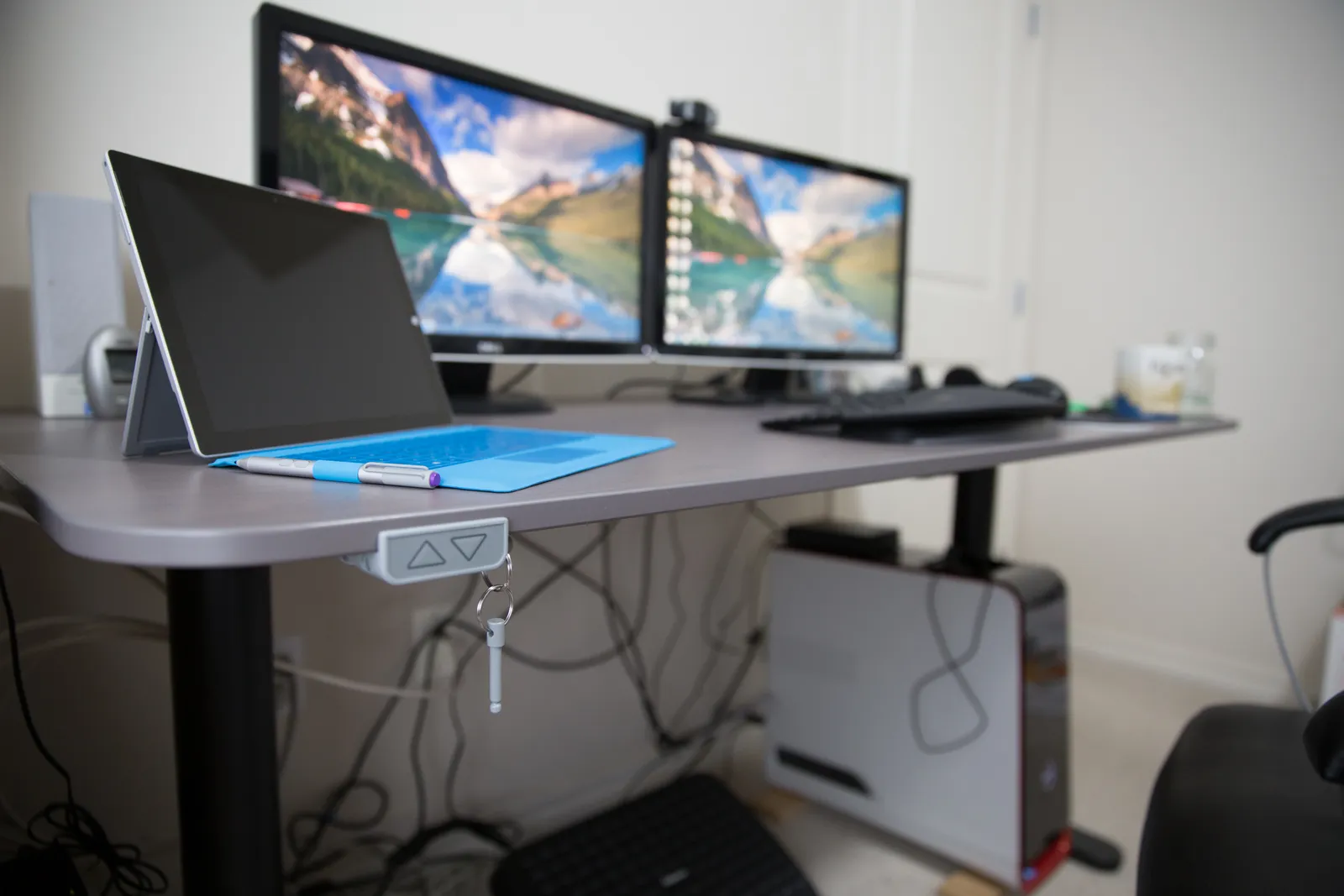
Weight capacity and wobble at height: the spec nobody reads carefully enough
Every standing desk lists a maximum weight capacity, and almost everyone ignores it until their monitor arm starts swaying every time they type. The number on the spec sheet is usually measured as a static load at the desk's midpoint height — it is not a guarantee of stability at full standing height with an off-center load, which is the situation you'll actually be in with a monitor arm, a laptop, a keyboard, and a coffee mug spread across the surface.
Two things matter more than the raw weight number: whether the frame is single-motor or dual-motor, and the leg design. Single-motor desks lift both legs from one motor via a synchronization bar; they're cheaper but noticeably wobblier at height, especially under side-to-side pressure like typing forcefully or leaning on the desk to stand up. Dual-motor desks drive each leg independently and hold height far more rigidly — if you plan to use a monitor arm, a heavy monitor (27 inches or larger), or you type with any force, dual-motor is worth the extra cost. Leg design matters too: a C-shaped or single-column leg frame is less rigid than a full rectangular frame with cross-bracing, particularly at heights above 45 inches, which is where most standing desk use actually happens for anyone over about 5'8".
Practical test: before buying, look for review videos or user photos of the desk at full height with a monitor arm mounted, and see whether anyone mentions wobble when typing. If a listing doesn't specify single vs. dual motor, assume single motor and price accordingly — it's usually the omission of a spec that would otherwise be a selling point.
Cable management: the unglamorous detail that makes or breaks daily use
This is the detail buying guides skip and the one that determines whether your desk looks tidy in month one and like a nest of cords by month three. Every time a standing desk moves, any cable that runs from the desktop to a wall outlet or dock has to flex, and cables that aren't managed will eventually snag, pull a plug loose, or get caught in the lift mechanism itself — which is both annoying and a wear point on the cable.
Full-frame desks that include a cable tray under the desktop are solving this properly: cables ride along with the desk as it moves, with enough slack in the tray to accommodate the height range without tension. If a desk doesn't include one, an aftermarket cable tray or a spiral cable sleeve with enough slack loop built in near the desk's rear edge is a reasonable substitute — the key is slack, not neatness. A common mistake is zip-tying cables tightly to the leg column to "keep them neat," which looks clean at desk-sitting height and then yanks taut or snaps at full standing height, disconnecting a monitor or charger mid-workday.
For converters, this is less of an issue since only the platform moves and it typically has a shorter range, but the same slack principle applies to any cable running from the platform down to a power strip.
Common mistakes that undo the benefit
The most common mistake is not adjusting monitor height when switching between sitting and standing. A monitor set correctly for a seated eye line will sit too low when you stand, forcing your neck into a forward, downward tilt for hours — which can produce more neck and shoulder strain standing than you ever had sitting. The top third of the screen should be roughly at eye level in both positions, which usually means a monitor arm with enough vertical range to follow the desk, not a fixed monitor stand that only works at one height.
The second common mistake is standing completely still for long stretches, which places static load on the same muscles a bad chair would, just in a different position — standing itself isn't inherently more "active" than sitting unless you're actually shifting weight, taking small steps, or using an anti-fatigue mat that encourages micro-movement. A cheap hard-floor stand for two hours straight can leave your lower back and feet worse off than sitting would have.
The third mistake is treating the desk purchase as the whole intervention. A standing desk changes posture, not fitness. It won't offset a day of otherwise no movement, and it isn't a substitute for actual exercise, stretching, or walking breaks — several ergonomics researchers have made this point directly: alternating between sitting and standing reduces the harm of prolonged static postures, but it does not meaningfully raise your overall activity level or calorie burn in any way that shows up as a health outcome on its own.
Finally, people underestimate the adjustment period. Standing for an unfamiliar number of hours a day causes real foot and calf fatigue in week one, even with good footwear, and a lot of buyers interpret that fatigue as "this doesn't work for me" and quit before their body adapts, typically over two to three weeks of gradually increasing standing time.
When a standing desk isn't worth it
Be honest with yourself about a few situations where the purchase is unlikely to pay off. If your job already involves regular movement — you're up and down for meetings, walking to grab things, or on your feet part of the day already — the marginal benefit of a standing desk is small, and the money is better spent on a good chair or a properly fitted monitor arm. If you have an existing back, hip, or foot condition, talk to a physical therapist or physician before assuming standing more is automatically better; for some conditions, prolonged standing is worse than prolonged sitting, not better. If your current setup is genuinely the bottleneck — a cramped desk, no monitor arm, a chair that doesn't support your lower back — fix those first, since they affect you in both sitting and standing positions and are usually cheaper to address. And if you know yourself well enough to predict that a new piece of furniture won't change a deeply sedentary routine, the desk alone won't be the thing that fixes it — a phone reminder to take a five-minute walk every hour will do more for your health than an unused standing desk ever will.
Decision framework: which type fits your situation
Use this as a quick filter rather than a rigid rule set — most people will fall clearly into one bucket once they answer a few honest questions about their space, budget, and how committed they actually are to changing their working posture.
- Renting, unsure if you'll keep the habit, budget under $300: desktop converter with a gas-spring lift. Low commitment, reversible, works on any existing desk.
- Own your space, want a permanent setup, budget $400–$700: full-frame electric desk, dual-motor if you'll mount a monitor arm or use a large monitor.
- Tight budget, willing to put in physical effort for each height change: manual crank full frame — accept that you'll likely settle into fewer position changes per day than an electric desk owner.
- Already stand for parts of your workday, or have an existing back/foot/hip condition: skip a standing desk purchase; prioritize a proper chair, monitor arm, and a conversation with a physical therapist instead.
- Multiple monitors or heavy equipment on the desk surface: full frame over converter, dual-motor over single-motor, regardless of budget tier — the stability difference is not optional at that load.
Whichever category you land in, treat the monitor arm and the anti-fatigue mat as part of the same purchase, not optional extras — a standing desk without a height-adjustable monitor and without something to break up static standing solves less than half the problem it's meant to solve. If you want to see how one specific dual-motor electric frame performs in day-to-day use, including measured wobble at full height and real cable management notes, see our hands-on FlexiSpot E7 standing desk review.

The takeaway
A standing desk is a genuinely useful tool for one specific problem: breaking up long, unbroken stretches of static sitting during a desk-bound workday. It is not a fitness device, not a posture cure-all, and not a guaranteed health upgrade — the research on standing desks supports modest benefits for comfort and self-reported energy, with much weaker evidence for the bigger health claims often attached to them in marketing copy. Buy based on how you'll actually use it: a converter if you want a low-commitment trial on your existing desk, a dual-motor electric frame if you want a permanent, stable, no-compromise setup, and skip the category entirely if your day already includes standing or your real bottleneck is a bad chair or poorly positioned monitor. Whatever you choose, budget for a monitor arm and an anti-fatigue mat alongside it, adjust your monitor height every time you change position, and give yourself two to three weeks to adapt before deciding whether it was worth it.
More coupon shopping advice

Home Security Camera Buying Guide: Local vs. Cloud Storage
A practical, balanced buying guide to home security cameras that weighs local storage against cloud subscriptions, wired versus battery power, camera placement, night vision, smart detection accuracy, and smart home integration.

Beginner Mirrorless Camera Buying Guide
A practical, honest walkthrough of what actually matters when buying your first mirrorless camera, from sensor size and lens mounts to autofocus, video specs, and the real total cost of a beginner-friendly system.

Air Purifier Buying Guide: CADR, ACH, and Filter Costs Explained
A practical walkthrough of the numbers that actually matter when buying an air purifier — CADR and ACH for sizing, true HEPA versus marketing terms, real three-year filter costs, realistic noise levels, and when a purifier won't help at all.