
Ray-Ban Meta Smart Glasses Review: Five Weeks Wearing a Camera on My Face
We wore Ray-Ban Meta smart glasses as daily sunglasses for five weeks to see if they actually pass as normal eyewear and whether the camera and voice assistant hold up.
- Genuinely passes as normal Wayfarer sunglasses in everyday social settings
- Open-ear audio is comfortable and surprisingly useful for calls and podcasts
- Hands-free photo and video capture from a true first-person view
- Prescription and polarized lens options through Ray-Ban's existing retail network
- Charging case makes daily top-ups painless
- Recording LED is easy for bystanders to miss or misunderstand
- Voice assistant is inconsistent, especially with weak signal
- Battery drains faster with heavy camera or call use
- Audio leaks at higher volumes in quiet shared spaces
- Requires a Meta account, routing media and voice data through its ecosystem
Smart glasses have a long history of embarrassing launches, and the specter of Google Glass's "glasshole" reputation still hangs over anyone strapping a camera to their face in public. Ray-Ban Meta smart glasses are the most convincing attempt yet at making that idea socially acceptable, built into an actual Wayfarer frame rather than an obviously robotic headset, with a camera, open-ear speakers, and a voice assistant packed into hardware that from three feet away just looks like sunglasses. We wore a pair as our primary sunglasses and casual daily-use eyewear for five weeks, through errands, a short trip, a few nights out, and a lot of ordinary hands-full moments, to see whether the fashion half of the pitch actually holds up alongside the tech half.
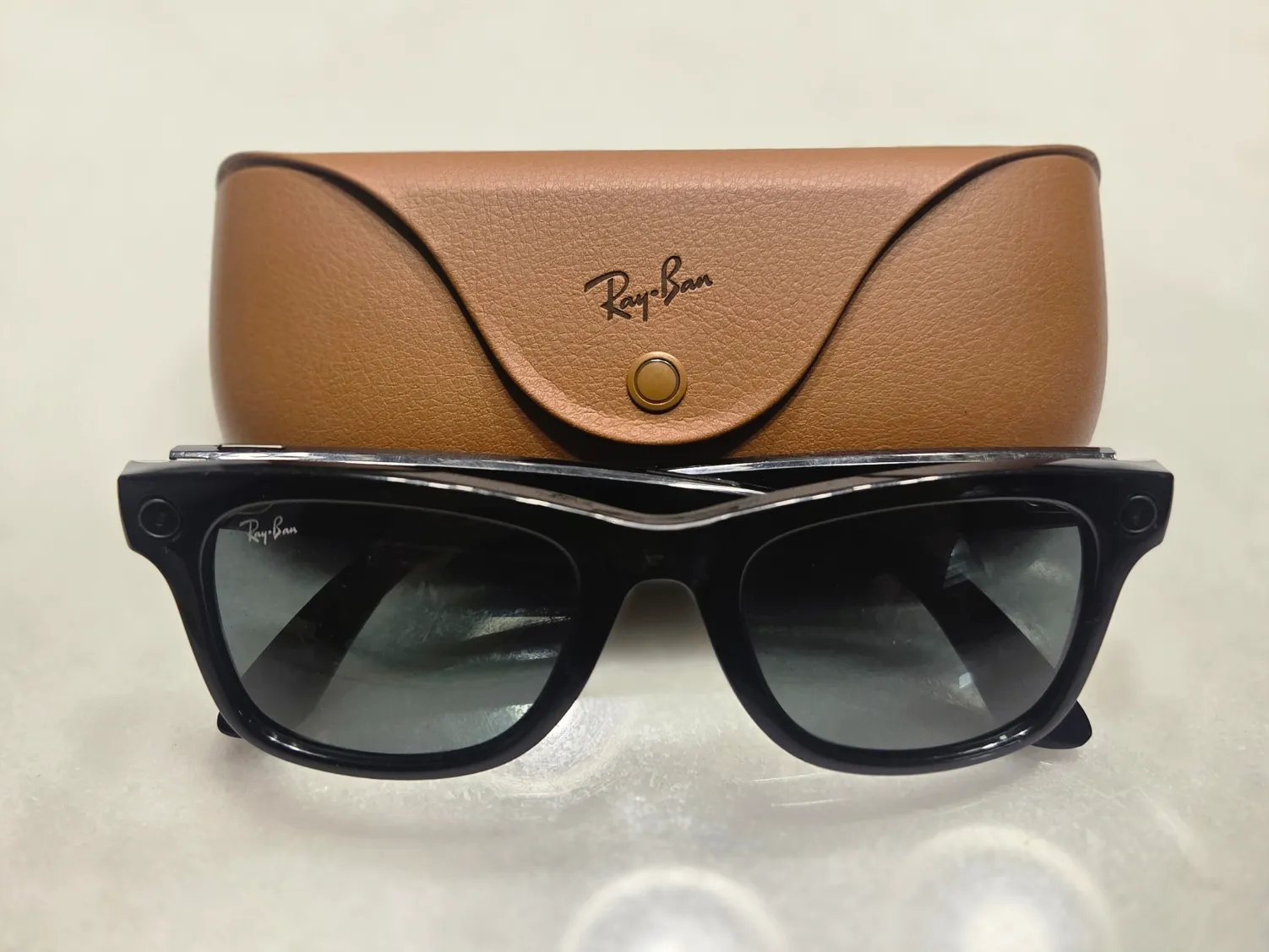
Do they actually pass as normal sunglasses?
This was our first and most skeptical question, and the honest answer is mostly yes. The frame is a genuine Wayfarer shape with the usual acetate finishes, and the tech is packed into a slightly thicker temple arm that's noticeable up close if you're specifically looking for it but easy to miss in normal social distance and lighting. Across five weeks of wearing them running errands, at a couple of restaurants, and at a friend's outdoor gathering, exactly one person noticed unprompted that they were anything other than regular Ray-Bans, and that was someone who works in tech and specifically clocked the camera lens visible on the front of the frame. For everyone else, they read as a slightly chunky pair of Wayfarers, which is a real achievement compared to the more obviously gadget-like designs of past smart glasses attempts.
The camera: genuinely useful, genuinely a privacy conversation
The built-in camera captures photos and video from the wearer's actual point of view with a simple press of a button on the frame, or hands-free with a voice command, and the appeal in practice is real: capturing a kid's birthday cake moment, a dog doing something ridiculous, or a scenic view while your hands are full of grocery bags, without fumbling for a phone. Video and photo quality is solidly good for a device this size, not matching a flagship phone camera in low light, but perfectly serviceable in daylight and well-lit indoor settings, and the wide point-of-view framing gives footage a genuinely different, more immersive feel than a phone held up and pointed at a scene.

The privacy side is the real friction point, and it deserves more attention than most product pages give it. There's a small LED light on the front of the frame that illuminates while recording, intended as a visible signal to bystanders that they're being filmed, but in five weeks of casual use we noticed most people simply don't register or understand what that light means, and more than once we had to explicitly explain to a friend that yes, the glasses could record, and yes, the light meant it currently was. This is a real social and ethical wrinkle for a device that's specifically designed to be inconspicuous: the same design goal that makes them comfortable to wear also makes them easier to use for recording people who don't realize what's happening, and prospective buyers should think honestly about the situations they'd wear these into before assuming everyone around them understands the tech.
Audio and calls: the feature we used more than the camera
Open-ear speakers built into the temple arms play audio directly toward your ear canal without blocking it, and this turned out to be the feature we reached for constantly, more than the camera, for podcasts and calls while walking, cooking, or doing chores around the house. Sound quality is good for spoken word and acceptable for music, though it lacks real bass and leaks noticeably at higher volumes, meaning anyone sitting close to you on a bus or a quiet office will hear a thin version of whatever you're listening to, a real consideration for shared spaces. Voice calls routed through the built-in microphones were clear on our end according to callers, even in the mild wind and background noise of walking outside, though a very windy day did introduce audible noise that a phone held closer to the mouth wouldn't have picked up as much.
The voice assistant: promising but inconsistent
The built-in Meta AI assistant handles basic requests like identifying what's in front of you, translating text, answering general questions, and controlling music playback, and when it works, it's a genuinely novel hands-free experience, like asking what kind of plant you're looking at during a walk and getting a plausible answer without touching a phone. Reliability across five weeks was inconsistent, though; certain requests worked cleanly every time, while others, especially anything relying on a live internet connection in an area with weaker signal, either failed outright or returned a noticeably delayed response that broke the hands-free convenience the feature is supposed to deliver. It's a feature we'd call promising rather than dependable, and buyers expecting a flawless AI assistant baked into their sunglasses will be disappointed by the real-world inconsistency, even if the best-case demonstrations are genuinely impressive.

Battery life and the charging case routine
Battery life on the glasses themselves is modest, lasting through a typical day of intermittent use, occasional photos, some music, a few short voice assistant queries, but genuinely draining faster on days with heavier camera or call use, sometimes needing a top-up by early evening. The included charging case, styled like a regular glasses case, extends this considerably and became part of our daily routine the same way a phone charger is; drop the glasses in the case in the car or on a nightstand, and they're topped up again within an hour or two. This case-dependent charging model works fine for daily rhythms but means these aren't a true all-day, forget-about-it device the way a normal pair of sunglasses is, and it's a real adjustment for anyone used to eyewear that never needs to be plugged in.
Comfort and everyday wearability
Despite the added electronics, the glasses were comfortable enough for extended wear across five weeks, including full days out running errands and a short flight, with the added weight in the temple arms noticeable if you specifically think about it but not distracting in practice. The nose pads and nearly identical Wayfarer proportions to a standard pair meant they fit into the same context a normal pair of sunglasses would, tucked into a shirt collar or pushed up on your head between uses, without feeling like a piece of technology strapped to your face, which is the single biggest difference between this and earlier smart glasses attempts that never escaped feeling gadget-first.

The app, companion setup, and the ecosystem lock-in
Setting up the glasses requires a companion phone app tied to Meta's account ecosystem, which is a real consideration for anyone hesitant about the company's broader data practices, since photos, video, and voice queries route through that same infrastructure. The app itself is straightforward, handling firmware updates, transferring captured media, and adjusting settings like capture quality and voice assistant preferences, and it worked reliably across five weeks without major bugs, but it's worth going in with clear eyes about which company is on the other end of every photo, call, and voice query these glasses handle.
Lens options and prescription fit
Beyond the tech, it's worth noting these are sold with the same range of lens options as regular Ray-Bans, including polarized and transition lenses, and prescription lenses can be fitted through an authorized optical retailer rather than being locked to a single non-adjustable lens like some past smart glasses attempts. We tested a pair with standard polarized sunglass lenses and separately tried on a prescription-fitted pair a colleague owned, and the process felt close enough to buying any other pair of prescription sunglasses that it removes a real barrier for anyone who needs corrective lenses and assumed smart glasses meant giving that up. Swapping lenses did require going through the same retailer network Ray-Ban already uses for regular frames, rather than a quick DIY swap, which is a minor inconvenience but consistent with how prescription sunglasses have always worked.
Who should actually buy these
Ray-Ban Meta smart glasses make the most sense for people who already wear sunglasses daily and want hands-free photo and audio capabilities layered on top without sacrificing how they look, particularly anyone active outdoors, traveling, or juggling kids or pets where a phone in hand is often impractical. They're a poor fit for anyone uncomfortable with the privacy tradeoffs of wearing a camera that bystanders may not register as a camera, anyone who wants a fully reliable AI assistant rather than an inconsistent one, or anyone unwilling to route their daily media and voice data through Meta's ecosystem.
The verdict
Five weeks of wearing these as daily sunglasses confirmed the fashion half of the pitch works better than any smart glasses attempt before it, genuinely passing as normal Wayfarers in almost every social setting we tested them in, while the open-ear audio turned out to be the most consistently useful feature day to day. The camera is a fun, occasionally genuinely useful addition with a real privacy wrinkle worth taking seriously, the voice assistant is more promising than dependable, and the case-charging routine is a real adjustment from normal eyewear, but as the first smart glasses that don't make you look or feel like you're wearing a gadget, this is a legitimately impressive product with clear-eyed tradeoffs rather than a novelty.
Other products we tested

Ecobee Smart Thermostat Premium Review: Two Months of Real HVAC Testing
We installed the Ecobee Smart Thermostat Premium without a C-wire, tracked its temperature accuracy against a separate thermometer, and measured real energy savings over two months of daily HVAC use.

Bose SoundLink Flex Review: Six Weeks of Hiking, Kayaking, and Beach Days
Six weeks of camping, kayaking, and beach trips show the Bose SoundLink Flex's IP67 rating and PositionIQ orientation sensing are genuinely useful, with honest limits on bass and max volume.

Coros Pace 3 Review: Six Weeks Testing the GPS Watch That Barely Needs Charging
A dual-frequency GPS running watch that trades AMOLED shine for weeks of battery life at a fraction of the price of flagship rivals.